
For your studio.
- Keep feedback and decisions close to the work.
- See pending tasks and the next project step.
- Give clients a consistent way to send corrections.
- Keep documents and payment details with the job.
Transform your stationery business
Build a stationery business that feels as considered as the work you create. Keep proposals, proofs, guest lists, approvals and payments in one refined workflow, so you can spend less time chasing the next step and more time moving projects forward.
Leads 9
Add LeadMove leads between stages without leaving the page.
Drag leads between columns to change their pipeline stage. Scroll horizontally to see every stage when your pipeline is wide.
Jamie Carter
Consult Oct 14
Priya & Daniel
Consult Oct 16
Harper baby announcement
Quote by Oct 9
Maya & Sam
Wedding Jun 2027
Northwind Co. launch event
Sent Oct 2
ViewedOlivia & Marcus
Sent Oct 3
Rosewood Bakery menus
Follow up Oct 8
Ellie & Noah
Follow up Oct 10
Chen holiday cards
Last reply Aug 28
Work Orders 9
Move work orders between stages without leaving the page.
Drag work orders between columns to change their pipeline stage. Click a card to view the project.
Ava & Theo save the dates
Wording due Oct 12
Lakeside Gala programs
Logo due Oct 9
Emma & James invitations
Round 2
Bloom Florals price cards
Started Oct 3
Sofia & Liam day-of paper
Proof sent Oct 4
Awaiting clientGrace & Henry invitations
Proof sent Oct 5
Claire & Ben signage
Approved Oct 1
LockedRuby & Owen invitations
Balance due Oct 20
Westfield Dental holiday cards
Deposit due Oct 11
Clear the friction
The small interruptions add up: another status email, another file to find, another list to correct. Bring the details into the same project so the next step is easier to see.
| The friction | A clearer way with VowProof |
|---|---|
| The frictionFeedback spread across emails and messages. | A clearer wayComments beside the proof they belong to. |
| The frictionTrying to find the latest approved file. | A clearer wayVersion history and a locked approved proof. |
| The frictionGuest corrections in separate spreadsheets. | A clearer wayOne guest list clients can update and confirm. |
| The frictionRepeating the same follow-ups by hand. | A clearer wayProof and payment reminders on your timing. |
| The frictionSwitching between project and payment details. | A clearer wayProposals, invoices and work orders connected to the project. |
One refined workflow
Your process can have structure and still make room for the details that make each stationery project different. Keep the booking, design decisions and production information connected as the work moves forward.
Inquire
Capture the inquiry and keep the next conversation organized.
Book
Bring the proposal, contract and deposit into the project.
Design
Keep project answers and proof versions close to the work.
Approve
Collect feedback, confirm details and record the sign-off.
Produce
Move forward with the approved files and connected work order.
A sample journey. Set up the steps that fit your studio.
Fewer loose ends
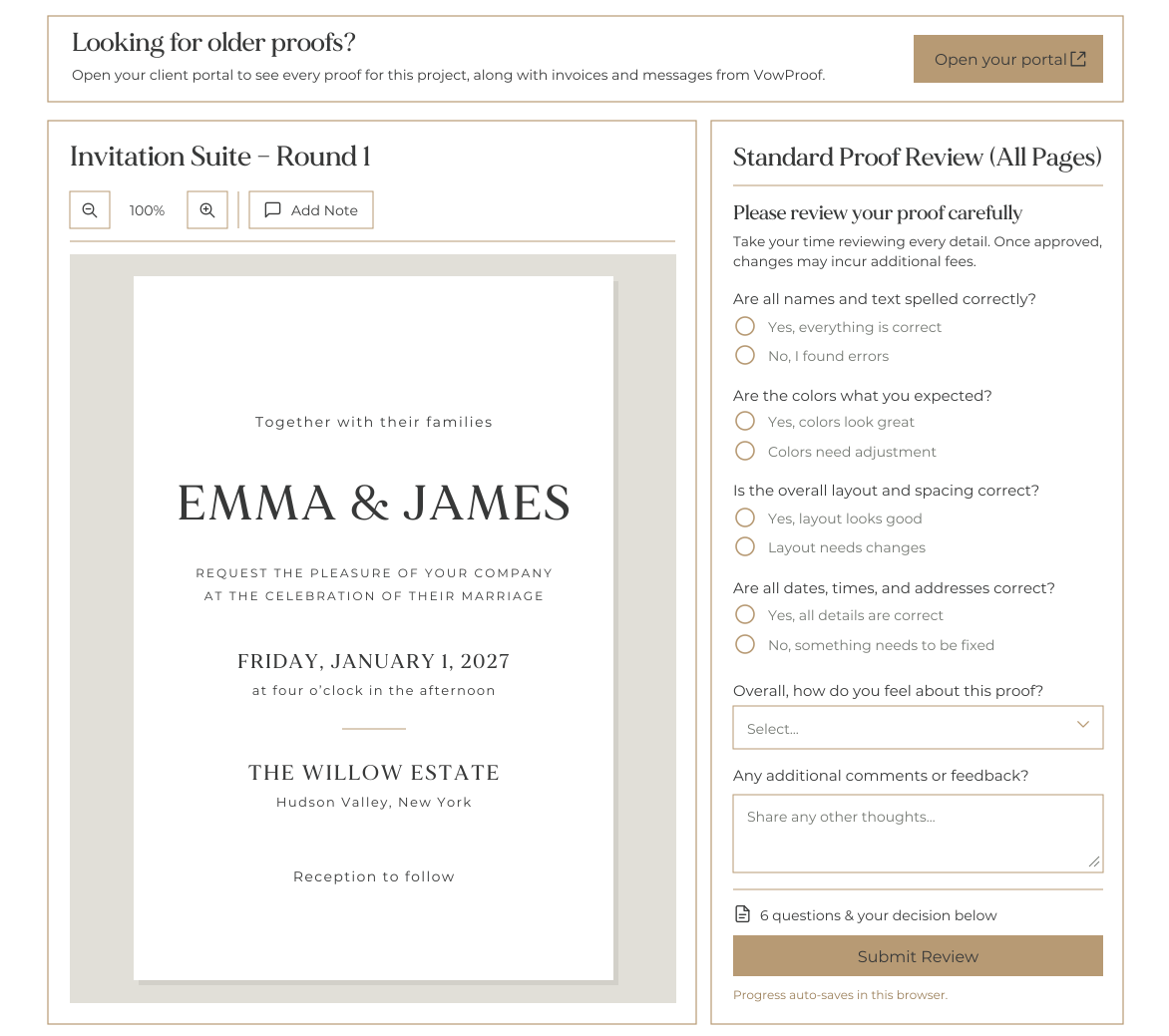
Keep the conversation close to the design. Clients leave feedback beside the piece they are reviewing, check the details and sign their approval. You have a clear record of what changed and which file was approved.
Better on both sides
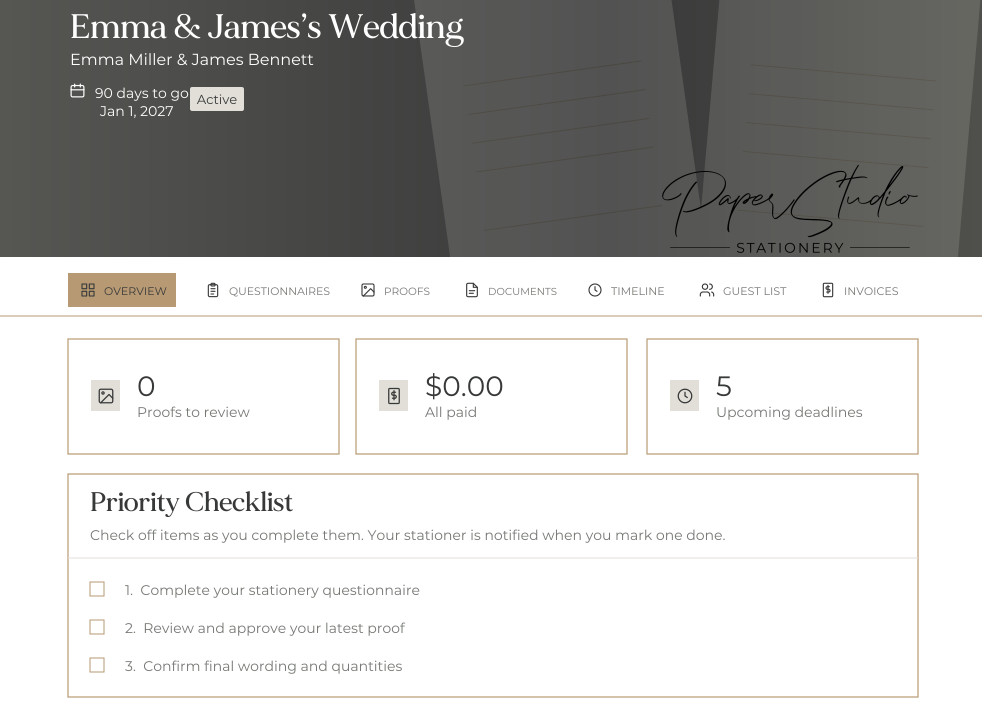
An organized process is something your clients can feel. They have one place to find the project, understand what you need and take the next step. You spend less of the conversation explaining where everything lives.
Grow with intention
More projects bring more details to manage. Build a consistent foundation for the repeatable parts, then give your attention to the design, decisions and client relationships that need you.
Start with reusable proposals, email messages, questionnaires and workflows. Carry your process into the next project with less rebuilding.
Use lead and project pipelines to see what is booked and where each job stands. Keep studio tasks and client decisions visible as your workload grows.
Customize your messages and build a client experience that reflects your studio. A repeatable process can still leave room for your voice and creative direction.
Professional adds unlimited custom workflows, project timelines and more control over client branding. Compare the plans
A manageable first step
Choose one part of your process that feels harder than it should. Build a simple path through it, try it with a sample project and add the next piece when you are ready.
Step 1
The moment you sign up, a short guided setup walks you through your branding, connections and first workflow. Your dashboard checklist ticks itself off as you go.
Step 2
Live in Five, our free setup guide. One small task a day, and you're fully set up by day five.
Step 3
Try the sample project, then run your next new client through VowProof. Current projects can finish where they are.
Before you begin
Bring it together
Bring the work together. Give clients a clear next step. Make more room for the creative business you are building.
Card needed to start, nothing charged for 30 days. Cancel anytime from your account settings.